
.svg)
.svg)
Qu'est-ce que les publicités pour les stocks automobiles sur Meta ?
Pour tirer le meilleur parti de la génération de prospects dans le secteur automobile sur Meta, misez sur une stratégie globale qui couvre l'ensemble du parcours d'achat.
Cela implique notamment d'utiliser une combinaison des formats publicitaires et de contenu disponibles, tels que les annonces de parc automobile (AIA) pour les phases de réflexion et de décision.
Qu'est-ce que les publicités pour les stocks automobiles sur Meta ?
Les publicités pour les stocks automobiles incitent les utilisateurs à acheter des véhicules grâce à une expérience en ligne optimisée via Meta. Il s'agit de publicités de type catalogue spécialement destinées aux entreprises du secteur automobile.
Les AIA s'affichent sous forme de catalogue sur Facebook et Instagram, en s'appuyant sur votre stock de véhicules pour créer des publicités ciblées.
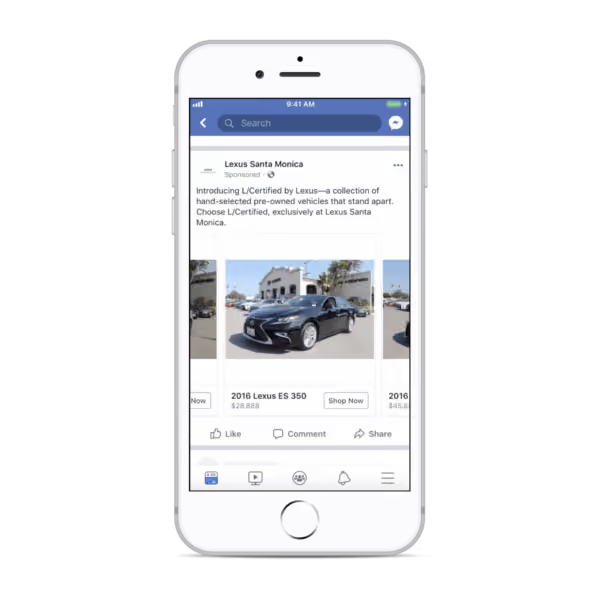
Source : MarTech
Ainsi, lorsqu'un utilisateur clique sur l'annonce, il est redirigé vers votre site web ou votre page d'accueil pour obtenir plus d'informations et laisser ses coordonnées.
Pour diffuser les AIA auprès du public le plus pertinent, Meta utilise les données provenant de :
- Les caractéristiques de votre véhicule (modèle, marque, année et prix)
- Balise Meta sur votre site web
- Les centres d'intérêt et l'engagement des utilisateurs sur Meta
Exemples d'annonces pour le stock automobile
Porsche Singapour a diffusé des publicités d'image sous forme de carrousel, accompagnées d'un appel à l'action « Réserver maintenant », qui redirigeait les acheteurs potentiels vers un formulaire instantané. La marque a utilisé des questions de qualification pour identifier plus précisément les prospects les plus intéressés.
En conséquence, Porsche Singapour a enregistré un coût par acquisition (CPL) inférieur de 30 % à celui de ses campagnes habituelles.
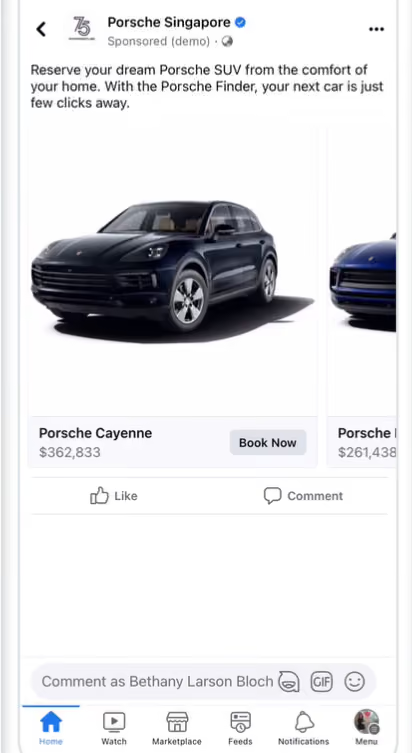
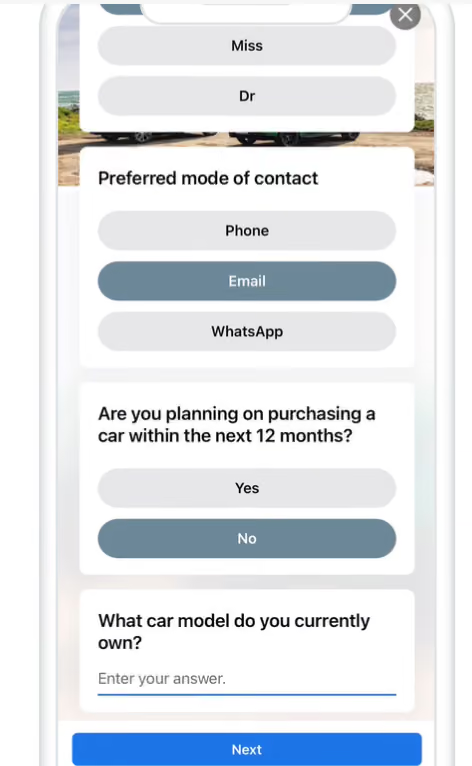
Source : Porsche Singapour, Facebook
Un concessionnaire Nissan a utilisé des AIA pour ses voitures d'occasion, en mettant en avant uniquement les informations essentielles concernant chaque véhicule. Ce texte publicitaire concis le rend plus pertinent pour les prospects très motivés.
En cliquant sur chacune d'elles, vous serez redirigé vers la page Web consacrée à chaque véhicule.
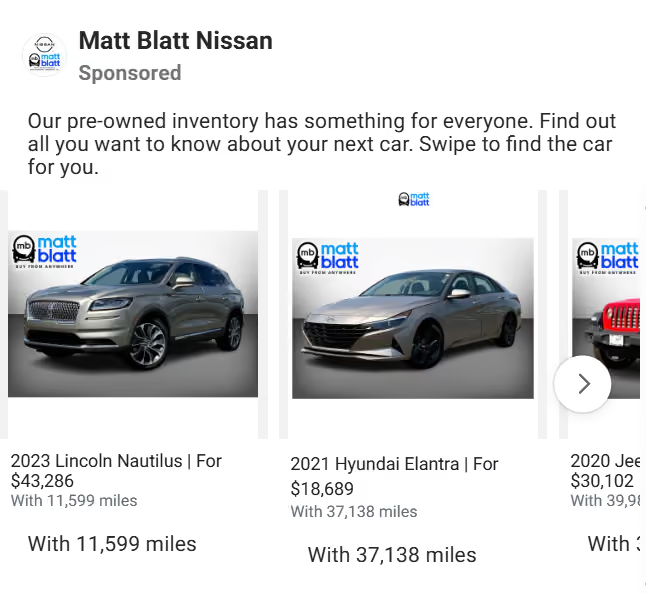
Source : Matt Blatt Nissan, Bibliothèque de publicités Facebook
Pourquoi utiliser les annonces de stock automobile pour générer des prospects ?
Voici pourquoi les AIA sont efficaces pour la génération de prospects :
- Ils ciblent les acheteurs potentiels de voitures qui ont l'intention d'acheter, en fonction de la disponibilité et des prix en temps réel.
- Cela augmente les chances de générer des prospects plus faciles et plus rapides à convertir.
- Vous pouvez également recibler les acheteurs qui ont déjà manifesté leur intérêt et utiliser des audiences similaires pour élargir votre portée, afin de trouver des prospects présentant une intention d'achat tout aussi forte.
- Les AIA offrent une configuration pratique. Il suffit de configurer la campagne une seule fois pour promouvoir l'ensemble du stock concerné, au lieu de créer des annonces distinctes pour chaque véhicule ou gamme.
- Elles se chargent plus rapidement sur mobile, car Meta optimise la page de détails du véhicule avec la destination sur Facebook.
Comment créer des publicités pour le secteur automobile sur Meta
Vous pouvez suivre ce guide étape par étape pour créer vos fichiers AIA :
- Créer un catalogue
Accédez à Commerce Manager depuis votre compte professionnel sur Meta.
Cliquez sur « Ajouter un catalogue » et sélectionnez « Auto » dans le champ « Type de catalogue ».
Saisissez le nom, puis cliquez sur Créer.
- Créer et télécharger un flux de véhicules
Créez le fichier de données pour les véhicules que vous souhaitez promouvoir.
Vous pouvez répertorier plusieurs véhicules dans le même flux. Vous pouvez également créer des rubriques distinctes pour différents groupes de véhicules (par exemple, les SUV en tant que voitures familiales).
Importez la liste des véhicules dans votre catalogue.
- Créer des ensembles de véhicules
Créez un sous-groupe d'articles dans votre catalogue pour choisir les véhicules qui apparaîtront dans vos annonces.
Par exemple, vous pourriez créer des sous-catégories distinctes pour les SUV et les berlines au sein de la catégorie « Voitures familiales ».
- Connectez le SDK Meta Pixel et/ou le SDK mobile au catalogue
Cela vous permet d'afficher des AIA aux utilisateurs qui ont déjà recherché ou interagi avec votre catalogue.
Le pixel Meta et/ou le SDK mobile vous permettent de comprendre, de suivre et de mesurer les actions des utilisateurs sur votre site web et votre application.
- Connecter Catalogue et Pixel
- Créer un modèle d'annonce
Créez l'annonce en saisissant les informations relatives à l'audience, aux formats créatifs, etc. pour la campagne.